

Nearly one third of the internet -- over a billion people -- are using YouTube to discover, consume, and share video content, according to the video-sharing giant's press page.
Just how much video content are these users actually consuming? A cool one billion hours a day.
Audience size aside, you might be wondering: Why YouTube? Why invest in building out a business channel there when you can just upload video content to your existing Facebook or Instagram or Snapchat account?
"Even with increased competition from Facebook and Snapchat, YouTube’s biggest selling point echoes that of parent company Google: It has intent," explains business and technology writer, Erin Griffith.

In other words, the platform's users are often showing up with a need in mind -- like how to cook a turkey or how to tie a tie. In fact, back in 2015, Google reported that searches related to "how to" on YouTube were growing 70% year over year.
"Being constantly connected has trained us to expect immediacy and relevance in moments of intent—the I-want-to-know, I-want-to-go, I-want-to-do, and I-want-to-buy moments," explains Google.
And this shift in technology and consumer behavior is something businesses really can't afford to ignore.
"When people ask how to do something, that's a need. That's someone asking, "can you help me out?" Digital media let brands respond to those questions and be there at the very moment someone needs them most. Brands that successfully do this can win loyalty and drive sales to boot," Google goes on to explain.
For these reasons and more, it's clear that YouTube provides businesses with an authentic, engaging platform for building and delighting your audience. But how do you get started? And perhaps more importantly, how do you grow?
Throughout this guide, we’ll cover four key channel growth levers -- branding, community, discoverability, and content strategy -- designed to help businesses like yours start recognizing the value of hosting video content on YouTube. To avoid overwhelming you, we've broken down the learnings into a 30-day plan, complete with explainer videos, business cases, and weekly action items.

As a business, you could be creating the most helpful, visually stunning videos imaginable, but if your channel fails to communicate that value upfront through thoughtful branding, you'll struggle to build an audience for those amazing videos.
A well-defined and executed brand strategy affects all aspects of a business -- and is directly connected to consumer needs, emotions, and competitive environments.
Before we begin to cover effective YouTube channel branding strategies, let's clear up the biggest misconception about brand strategy: Your brand is not limited to your product, your logo, your website, or your name.
Will these elements come into play as you work through your channel branding exercises? Of course. But it's important to remember that your brand, in its entirety, is much more than that. It's about your purpose and your vision. It's about what your business authentically represents -- and how that translates in the eyes of the consumer.


It was 2006 when Red Bull, an Australian energy drink company, uploaded their very first video to YouTube. Since then, the brand has evolved into a sports, music, and entertainment giant, operating much like a true multi-media publishing house.
Today, Red Bull's YouTube channel boasts an impressive 7+ million subscribers and a practically unimaginable 2+ billion video views. A quick look at some of the brand's channel statistics reveals that this audience growth shows no signs of slowing down: the channel manages to gain nearly 3K new subscribers daily.
One of Red Bull's most noteworthy accomplishments? The company's strategic approach to brand building.
As explained in the video above, YouTube offers a ton of opportunities for businesses to insert their branding into their channel. Of course, Red Bull takes advantage of all of these features by seamlessly infusing its brands into all aspects of its channel.
Channel Icon
Red Bull's icon represents the brand's multi-platform media channel, Red Bull TV, which includes the signature red bull that has become visually synonymous with the company. The icon is clear and high quality -- regardless of scale -- which is a best practice noted by the YouTube Creators Academy.

Channel Art
Red Bull makes great use of its channel art real estate, using a timely banner that highlights featured content for the month. The banner mixes on-brand imagery with center-aligned text to ensure that the banner appears legible across different device types.

Channel Description
Red Bull's channel description is expertly crafted, with nods to the brands action-packed content and always-on energy. The "world of Red Bull" positioning suggests that Red Bull is more than just a brand -- it's an experience and it's a community. The description also cites the brand's original series and competitions to give potential subscribers a sense of what to expect from the channel.

Custom Thumbnails
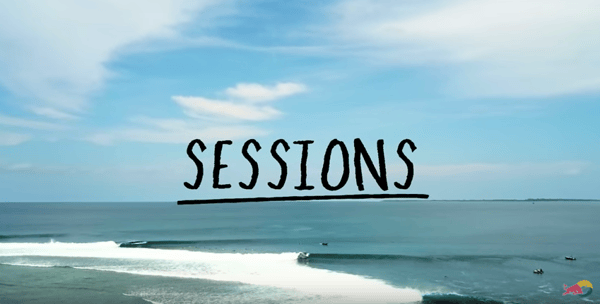
According to the YouTube Creators Academy, 90% of the best-performing videos on YouTube have custom thumbnails. Red Bull employs custom, cohesive thumbnails for each of its original series -- such as Sessions, Shred Hacks, and Dedicate -- to help viewers familiarize themselves with the recurring content.
Cards
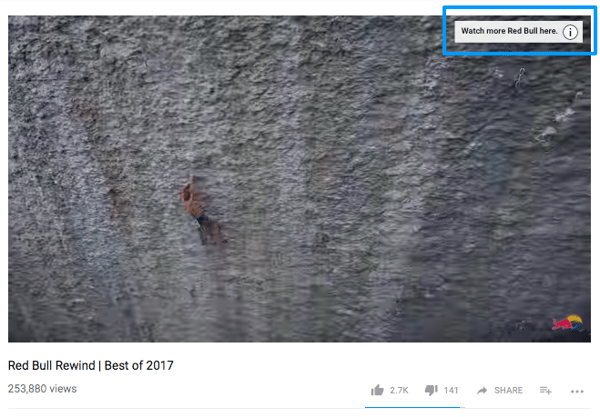
Cards, appearing on both mobile and desktop devices, provide an opportunity to push your viewers towards other videos, channels, polls, and so on.
Below, you can see how Red Bull inserted a Card into its channel trailer to push viewers to consume even more Red Bull content. When a viewer clicks the Card, it expands to reveal five new video options to explore. This particular card was triggered within the first few seconds of the video, allowing Red Bull an opportunity to capture those about to lose interest before they drop off.
Watermark
Red Bull's videos include the brand's signature watermark in the bottom right-hand corner, which reveals the option to subscribe when hovered over. The watermark is an important branding inclusion, as it provides viewers with an opportunity to subscribe to the channel without leaving the video window.
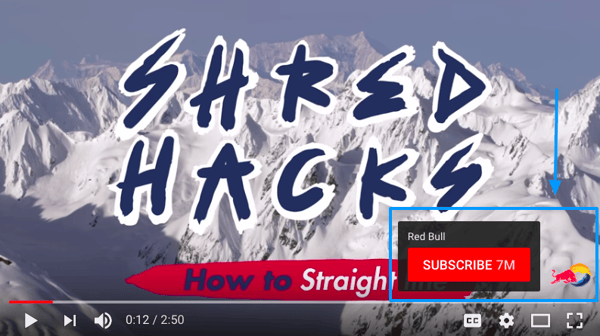
Pro Tip: Before you settle on a watermark design, run a few experiments. Just like a call-to-action on your website, testing different colors, shapes, and overall variants could significantly increase the performance of your watermark. In fact, Backlinko founder, Brian Dean, was able to increase his subscriber numbers via the watermark by over 69% by swapping out a white version of his logo for a red subscriber button.
Channel Trailer
Red Bull's channel trailer takes shape through a look back at the brand's top 2017 moments. This "year in review" style video is comprised of quick, high-energy clips, giving unsubscribed viewers a taste of the Red Bull brand, content, and overall experience.
Red Bull also uses the channel trailer description to call out some of its more niche extensions, such as Red Bull Music & Culture, Red Bull Racing, and Red Bull Esports.

Day 1: Watch the video and read the business breakdown above to gain a foundational understanding of business branding on YouTube. Then, take 20-30 minutes to reflect on your brand.
During this time, jot down some thoughts around:
- Why do you do what you do
- How you do what you do
- What you do for your customers
- How what you do for your customers is different from your competitors
The answers to these questions will help you craft a unique, on-brand mission for your business channel on YouTube. Remember: It's important to think about these things upfront to ensure you have a clear sense of what your brand stands for, before you try to translate that through your content on the YouTube platform.
Day 2-4: Perform a channel art audit and make some strategic changes.
Start by spending 30-60 minutes reviewing the channel art on other business YouTube channels. As you review, don't limit to only businesses in your industry: look outside of your niche to uncover channel art use cases that will set you apart from everyone else in your lane.
To help you get started, here's a short list of some of the brands we admire: GoPro, BMW, Google, HP, Adobe, and IBM.
Once you have a sense of what's out there, set up a meeting with your design team or designer to talk through the changes you might make to your existing channel art. Pull up the examples to help them get on the same page so they can help you bring your vision to life.
Don't have a dedicated design team? Not to worry. There are a ton of free channel art resources you can use to revamp your existing look -- no design skills required. Here's a short list of some of our favorite resources: Canva, Adobe Spark, Fotor, and Crello.
Day 5-7: Conduct in-video branding optimizations.
Once you align all of the visual branding elements -- icons, banners, thumbnails, etc. -- you need to start thinking about the improvements you can make to highlight your brand within the actual video content. This means identifying opportunities to insert cards into your videos, as well as introducing a branded watermark.
Again, spend some time reviewing how other businesses are using these features to promote brand awareness and grow their channels. When you're ready to make some changes, start by identifying 2-3 videos to test cards out on. Let the data accrue for at least a week, and then revisit the impact before investing the time in rolling these features out across all of your videos.

Although marketers all wish the whole "if you build it, they will come" approach worked, we know that building a following requires more effort than simply hitting "Publish." Organically attracting a loyal audience of fans and brand advocates is more of a slow, steady process, but it's one that pays off over time -- especially on YouTube.
As a business on YouTube, it's your job to be focused on strengthening the relationship you have with your existing audience, while constantly innovating to attract a new audience. This balance will help you retain your subscriber base, open up opportunities for new subscriber acquisition, and foster a community around your content.
One of the hardest parts about building that community is getting those first one thousand subscribers through the door. And as the YouTube Creators Academy puts it, "community building on YouTube is an evolutionary process."

To say that Refinery29 -- a digital media and entertainment company for the modern woman -- is raising the bar for lifestyle video content would be an understatement. The brand's refreshing, skillful approach to video spans nearly every platform, though its presence on YouTube is one worth taking a closer look at.
"Refinery29’s presence on YouTube has proven to be a boon for the media brand in terms of average 30-day engagement rates (ER30). The ten videos which boast the highest ER30 of all Refinery29’s social profiles live on the brand’s YouTube channel, with the top five clips amazingly seeing ER30 figures of 10x+," explains content marketer and video expert, Bree Brouwer.
"This means those five videos are performing at least 9x better on average than most other videos on YouTube," Brouwer added.
In the last 30 days alone, Refinery29 has added nearly 60K new subscribers to its community on YouTube -- an average of nearly 2K subscribers a day.
What's the key to the media company's success in scaling such an impressive audience? Let's review.
Refinery29's Publishing Schedule
When you're just getting started on YouTube, finding the time and resources to publish content consistently, or according to a set schedule, can come as a challenge. However, as we mentioned in the video, sticking to a regular video release schedule will help you build viewership by setting your audience’s consumption expectations and giving them a reason to come back to your channel.
In short: It's hard, but it's critical. Luckily, Refinery29's sets a great example for businesses that are on the fence about the value of committing to a regular publishing schedule.
Refinery29 publishes a lot of series-style video content: How Stuff Is Made, Beauty Evolution, Sweet Digs, Macro Beauty, Shady, World Wide Wed, Skin Deep, Get Real ... just to name a few. And for some of its more popular series, like Try Living With Lucie and Beauty With Mi, Refinery29 commits to a weekly publishing schedule:
- Fridays: Try Living With Lucie
- Mondays: Beauty With Mi
This publishing schedule is communicated via the channel trailer -- and it's also typically mentioned at the beginning of the individual episodes for both series, as shown below:
.gif?width=480&height=270&name=Animated%20GIF-downsized_large%20(2).gif)
Refinery29's Subscription Call-to-Action
If you want people to subscribe to your channel, you've gotta ask.
Within the first few seconds of each Refinery29 video, the host takes a moment to invite unsubscribed viewers to stick around by subscribing via the link in the description or the watermark, depending on their device type. This small inclusion has the ability to continuously support Refinery29's subscriber growth goals, with minimal upfront effort.
Here's an example from the "Sweet Digs" series:

And another courtesy of "Try Living With Lucie" host, Lucie Fink:
.gif?width=480&height=270&name=Animated%20GIF-downsized_large%20(1).gif)
Pro Tip: Many channels coin a name for their subscribers to create a sense of community and exclusivity that brings them closer. Tim Schmoyer, the educator behind the Video Creators channel on YouTube, advises that you actually let your community name themselves. Once they suggest a name that you think works, it's your job to affirm it and use it consistently in your future videos to help it stick.
Refinery29's Strategic Homepage Sections
YouTube allows for channel homepage customization through the use of sections. Sections allow you to group related videos together, making it easier for viewers to recognize the types of video content you have to offer. Many channels, Refinery29 included, use sections to highlight their best video content towards the top of their homepage -- whether that be most-viewed videos, most-liked videos, etc.
Below the "Best of Refinery29," viewers will find curated sections for each of its original series. This approach is ideal, as it allows viewers to binge the content that's most interesting to them without having to hunt down the next video in the series themselves. Remember: When it comes to convincing unsubscribed viewers to stick around, making your best content as easy as possible to consume is key.
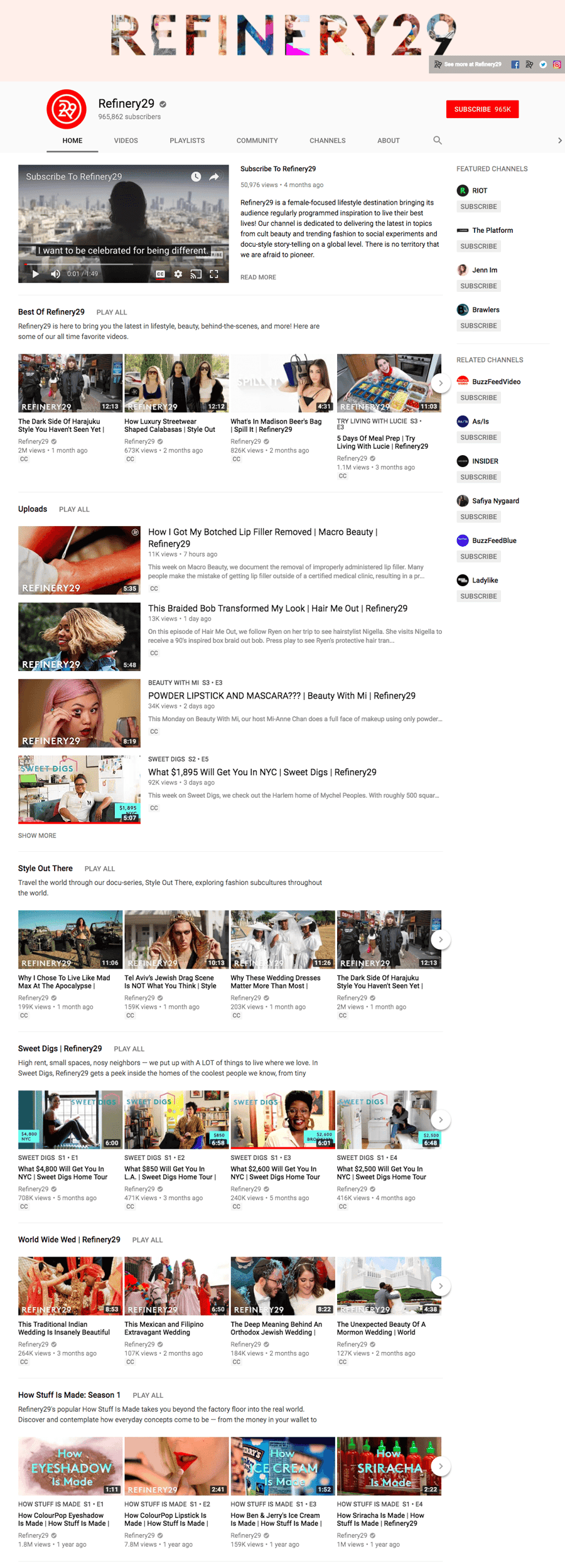
Pro Tip: Use YouTube Analytics to identify the videos that drive the most subscriptions. Then, add these videos to a playlist that can be featured at the top of your channel homepage.
Day 1: Watch the video and read the business breakdown above to gain a foundational understanding of community building on YouTube. Then, take 20-30 minutes to reflect on your audience.
Using the below Venn diagram as a framework, jot down some thoughts around the intersection between your audience and your brand.
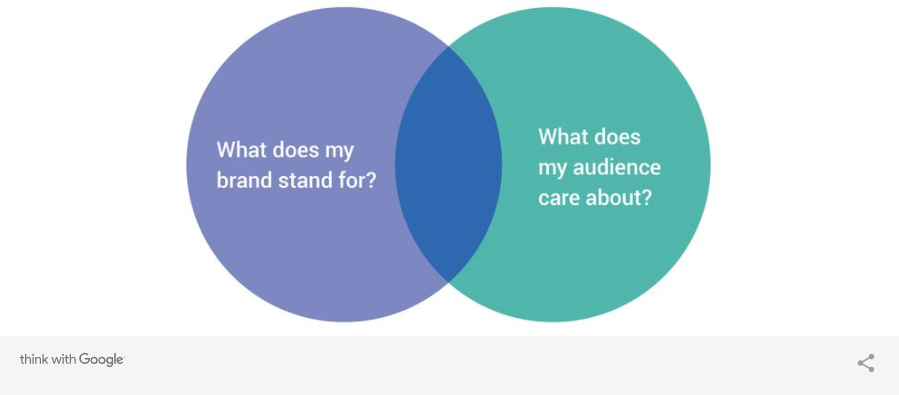
This exercise should help you get in an audience-first mindset, which will ultimately make it easier for you to think strategically about how to encourage unsubscribed viewers to stick around and get to know your business and brand.
Day 2-4: Audit your existing content to identify trends that could inform a series aimed at bringing people back to your channel.
Do you have a handful of how-to style videos that could be transitioned into an educational series? Maybe you have a bunch of product demos that you could position as a product mastery series? Use your notes from the Venn diagram exercise to validate your audience's potential interest level for each series idea you come up with.
Other questions to ask yourself when validating these series ideas are:
- Is this shareable?
- Is there a way to make this interactive?
- Is this idea sustainable? Do we have the resources to record, edit, and publish this type of video on a weekly or monthly cadence?
- How can you ensure this type of content will get discovered? Is there search volume?
Remember: In order to be effective, series content needs to be consistent. Don't commit to a regular publishing schedule unless you're confident you'll be able to deliver, as this will help you build credibility with your community.
Day 5-7: Customize your channel homepage using sections.
Remember: If the goal is building your community, you want to feature videos with a high subscribe rate at the very top. Additionally, you might also group together your most-viewed videos, as those serve as a positive representation of your business.
For more info on how to organize your content using custom sections, check out this resource.

YouTube's robust search and discovery system has two main goals: 1) make it easy for viewers to find relevant video content based on their queries and 2) promote long-term engagement with the platform. And with over 400 hours of video being uploaded to the platform a minute, YouTube's engines are working around the clock to analyze, sort, and rank these videos based on a number of factors -- that are constantly subject to change.
If you know a thing or two about traditional SEO best practices for ranking content in Google, this level of constant change and ambiguity around ranking signals should come as no surprise. And much like on-page SEO, there are a number of elements you can optimize on YouTube to help the search engine better understand and index your videos.
In its own words, YouTube explains: "Videos are ranked based on a variety of factors including how well the title, description, and video content match the viewer’s query. Beyond that, we look at which videos have driven the most engagement for a query, and make sure it’s easy for viewers to find those. Search results are not a list of the most-viewed videos for a given query."
Below, we'll cover these indicators in more detail so you can get a better sense of how to position your video content for page one success.

Much like Google's search engine, YouTube surfaces the best-fit videos based on the query a user inputs into the search box. Written video elements such as the title and description are factored into that ranking, as well as engagement metrics such as watch time, as these signal that other users have found the content valuable enough to watch it all the way through.
One of the businesses that has made an effort to fully understand and better leverage these ranking factors is Backlinko. Head up by founder Brian Dean, Backlinko has built a credible reputation when it comes to educating both new and seasoned YouTubers on how to increase their discoverability.
And this commitment to understanding YouTube SEO has certainly paid off for the business: "Ranking on YouTube has been one of the biggest drivers of leads and sales for me this year. I send out a ‘welcome’ email to new email subscribers. And a growing percentage (around 15%) say they first found me on YouTube. But more importantly, surveys from customers show that they're also finding me via YouTube. They also cite my YouTube videos as a specific reason that they decided to sign up," explains Dean.
To give you a sense of what Backlinko is doing right, and how you can replicate it for your business channel, let's walk through the discoverability factors and examples below.
Video Titles & Descriptions
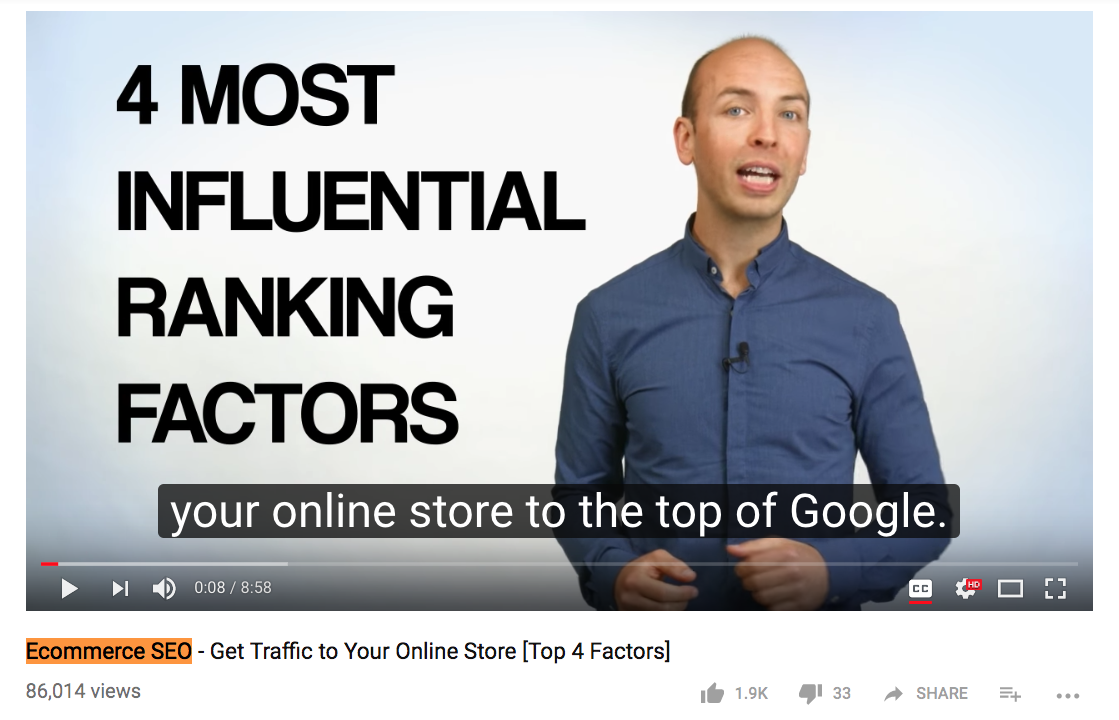
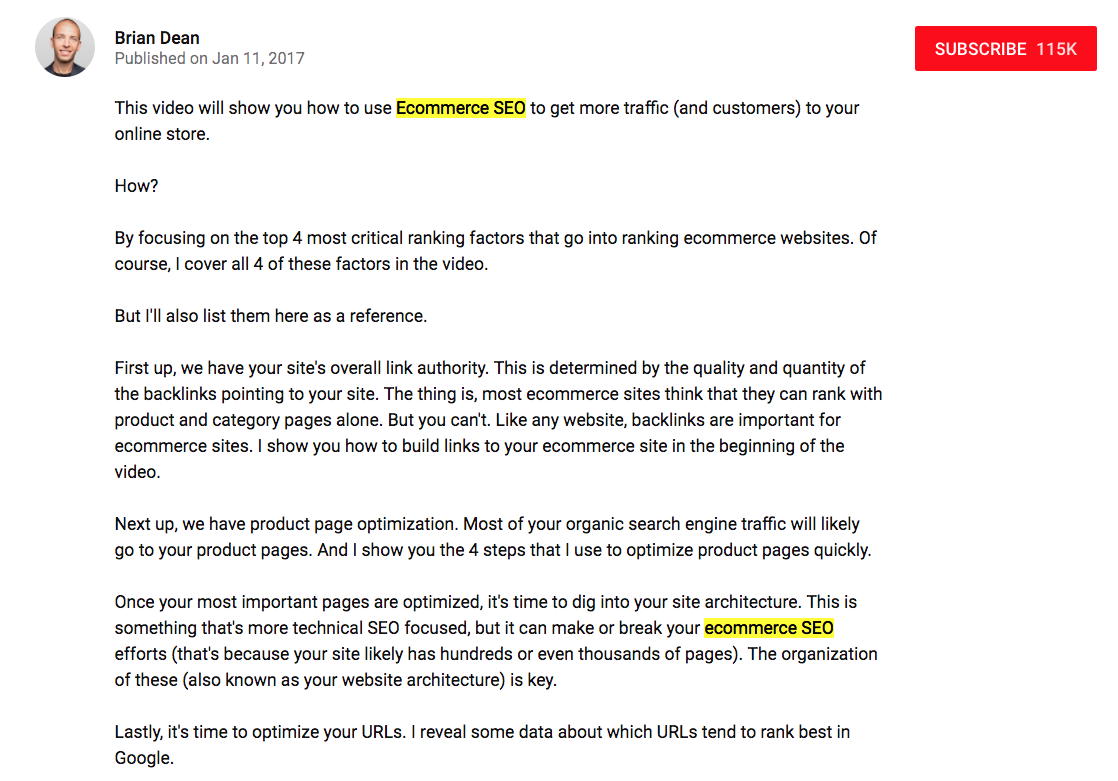
Dean starts his video ideation process with a specific keyword in mind. This helps him ensure that if he is going to invest the time and resources into creating a video, there's going to be demand for that video. Once the video is created, he crafts a title and a video description that includes the keyword in an obvious, yet natural way.
Below you can see an example of a video title and description that Dean put together to target the "ecommerce SEO" keyword:
Categories & Tags
Categories and tags are two elements that YouTube uses to help channels get their videos in front of the right audience -- an audience that is interested in the content they are creating.
Categories:
If you turn to the description box on any of Dean's videos, you'll notice that he's selected the "How-to & Style" category to help make his tactical, tutorial-style videos more discoverable.

"In order to optimize a channel, it is helpful to conduct research to understand what is popular within a content category. One way to start this process is to look at other YouTube channels within the same category. Think about the channel category or how someone would describe the channel you’re working with, enter in this information into the YouTube search bar, and filter by channel. Start niche and then broaden your search accordingly to see larger themes," advises the YouTube Creators Academy.
Tags:
Tags, like categories, exist to help viewers find your video content. They can be added to videos during the upload process, but as of 2012, the tags are not shown to the public -- hence why we can't provide a Backlinko example here.
This change came after YouTube found that most users weren't interacting with them -- and many users were abusing the use of video tags. The 2012 announcement did, however, urge users to continue to add them to videos to "aid discoverability." Note: This feature is not available for videos uploaded after June 2016.
SRT Files
Subtitles and closed captions expand the potential reach of your video content by making is accessible to a larger audience, including deaf or hard of hearing viewers, as well as those who don't speak your default language.
According to the YouTube Creators Academy, on average, two-thirds of a channel’s views come from outside the creator’s home country. While this statistic alone makes a case for creating a more inclusive, accessible channel through the use of YouTube's translation tools, adding subtitles and closed captions also helps YouTube understand and index your video content.
You'll notice that each of Dean's videos boasts the CC icon, indicating that closed captions are available for every single video.

Video Thumbnails
Your video thumbnail is the main image viewers see when scrolling through a results page -- and it can have a significant impact on the number of clicks and views your video receives. In fact, 90% of the best-performing videos on YouTube have custom thumbnails, according to the YouTube Creator Academy. (Note: To upload custom thumbnails, you must have a verified account.)
Dean strives for both consistency and contrast in his approach to video thumbnails, as shown below:
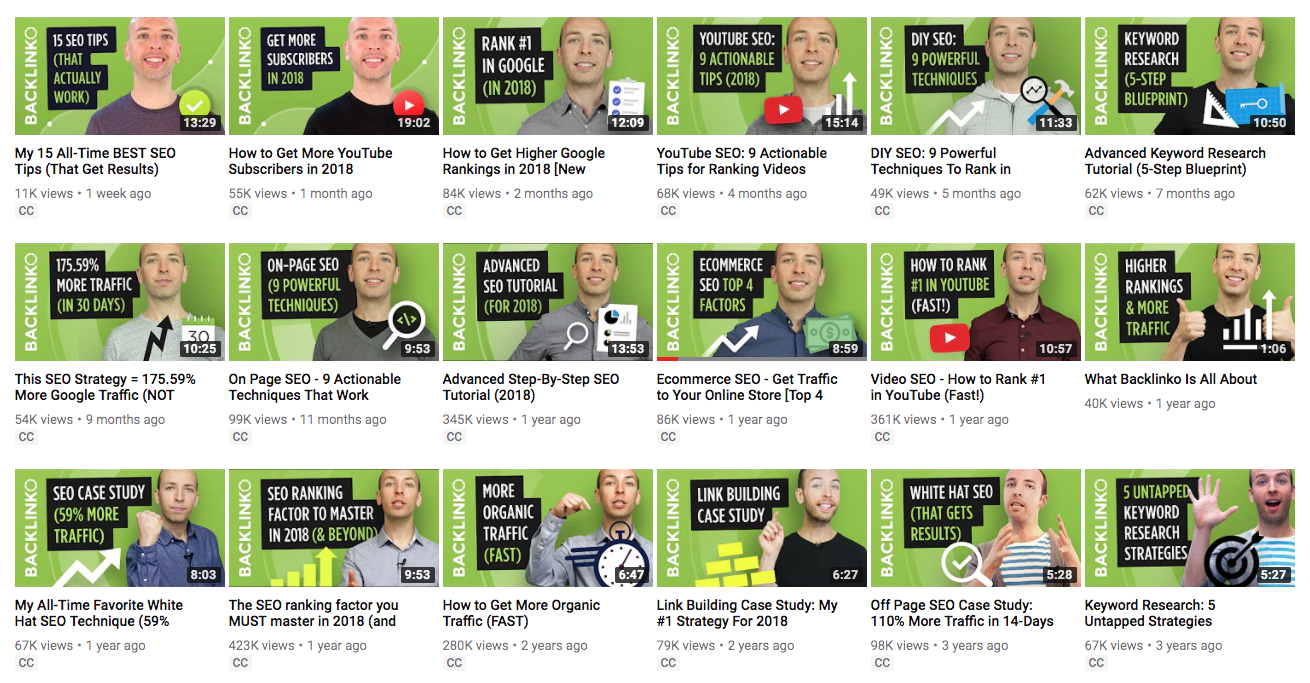
The green backdrop is not only representative of the Backlinko brand, but it also helps Dean's videos stand out against the competition on a results page. Additionally, he includes the video title within the thumbnail in an effort to further convey the value and key information being covered.
Day 1: Watch the video and read the business breakdown above to gain a foundational understanding of content discoverability on YouTube.
Because discoverability is one of the more challenging YouTube growth levers to master, we also recommend that you check out the following YouTube Creators Academy video, which explores how YouTube search works in a quick and concise way.
Click here to watch: How YouTube Search Works.
Day 2-4: Conduct keyword research.
There are dozens of recommended ways to conduct keyword research for YouTube. To help you get started, we've outlined one of the most popular techniques below:
YouTube Search: YouTube's very own search box offers an autocomplete functionality that comes in handy when performing keyword research for your videos. To get started, begin typing a word that appears in one of your video titles -- let's use "marketing," for example -- and record the suggestions populated by YouTube (see below).
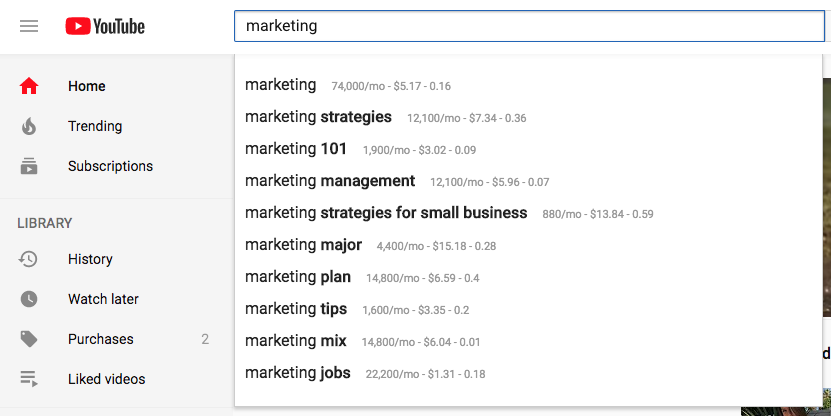
Once you have a list of high-volume keywords, you can start applying your findings to existing video titles and descriptions. As you work through this, keep the following best practices for crafting optimized titles and descriptions in mind:
- Titles: When we search for videos, one of the first things that our eyes are drawn to is the title. That's often what determines whether or not the viewer will click to watch your video, so the title should not only be compelling, but also, clear and concise. HubSpot Content Strategist Alicia Collins recommends limiting it to 60 characters to help keep it from getting cut off in results pages. As for that keyword, try to position it as close to the beginning of your title as possible for maximum visibility.
- Descriptions: According to Google, the official character limit for YouTube video descriptions is 1,000 characters. And while it's okay to use all of that space, remember that your viewer most likely came here to watch a video, not to read a story. If you do choose to write a longer description, keep in mind that YouTube only displays the first two or three lines of text -- that amounts to about 100 characters. After that point, viewers have to click “show more” to see the full description. That's why we suggest front-loading the description with the most important information, like CTAs, keywords, or important links.
Day 5-7: Clean up your thumbnails and explore YouTube's translation tools.
With some optimizations in place, it's time to tidy up your thumbnails.
Depending on the current state of your thumbnail strategy, you'll either have a lot of work to do -- or a little. Regardless, the important thing to keep in mind as you work through this stage of channel optimization is consistency. If you need a reminder of what to strive for, look back to the Backlinko example above. And if you need help designing new thumbnails for your videos, check out these free design resources:
Once you knock out your thumbnail clean up, focus your efforts on leveraging YouTube's translation tools to enable captions that'll help make your video content more discoverable and accessible.
When it comes to captions, YouTube offers three ways to get started:
- Add your own translations
- Get community contributions
- Use automatic captions
You can learn more about each option here to select the route that makes the most sense for your business.
Pro tip: If you have a large backlog of video content, create a schedule that enables you to focus on optimizing the captions for 3-5 videos a week to avoid feeling overwhelmed by the task.

At this point in the 30-day plan, you've learned a lot about your brand, your audience, and the importance of discoverability on YouTube. The last piece of the puzzle? Bringing it all together into a data-driven YouTube content strategy.
Like any aspect of your marketing, having a dedicated strategy that's specific to the platform you plan to publish on -- in this case, YouTube -- is key to your long-term success and growth. And because video typically requires a bigger investment of time and resources than a written piece of content, this is not the time or place to make it up as you go along.
One of the best ways to tee your videos up for success on YouTube is to get in the habit of constantly learning from their performance -- and then using that data to drive your next video or series idea. This approach to content strategy not only eliminates the guesswork that comes along with brainstorming video ideas, but it also places the emphasis back on the audience ... and their interests ... and their wants ... and their needs.
Luckily, YouTube offers really robust analytics that make collecting this data really easy. From there, it's up to you to slice, dice, and interpret that information to gain a complete understanding of what it'll take for your next video to succeed.
To help you narrow your focus, we'll walk through some suggested content audits and analyses you can perform to uncover valuable directives for your video content. We'll also take a look at how GE think strategically about its video strategy on YouTube -- and how that approach is paying off.

Since investing in YouTube content back in 2005, GE has learned a thing or two about how to leverage the platform -- and the data that comes with it -- to inform a video strategy that keeps its channel growing. As it stands today, GE's channel is growing by roughly 100 subscribers and 30K views every single day.
What contributes to this impressive growth? The obvious answer is GE's commitment to establishing itself as a leader in the technology and science space. And when you peel back the layers of that commitment, you'll find each of the thoughtful, data-driven efforts the company has tried, tested, and tried again in an attempt to better understand its audience and their content consumption preferences.
To give you a closer look at some of GE's video endeavors over the years, we've covered a few below alongside the type of content analysis they best align with.
Audience Analysis
To create a tailored content strategy, you need to start by auditing your audience. The more you know about who is watching your videos, the easier it will be to create content that matches those viewers unique needs and interests.
GE's YouTube collaboration with the Slow Mo Guys -- a science and tech web series hosted by Gavin Free and Daniel Charles Gruchy -- proves that it as a handle on not only who is watching their videos but also how they can leverage that insight to attract a similar audience.
"GE looked at 'The Slow Mo Guys' on YouTube and considered what is making them interesting. Rather than trying to replicate them, we decided to work with them," explained Jenna Pelkey, GE’s former director of global media and marketing strategy, in an interview with eMarketer.
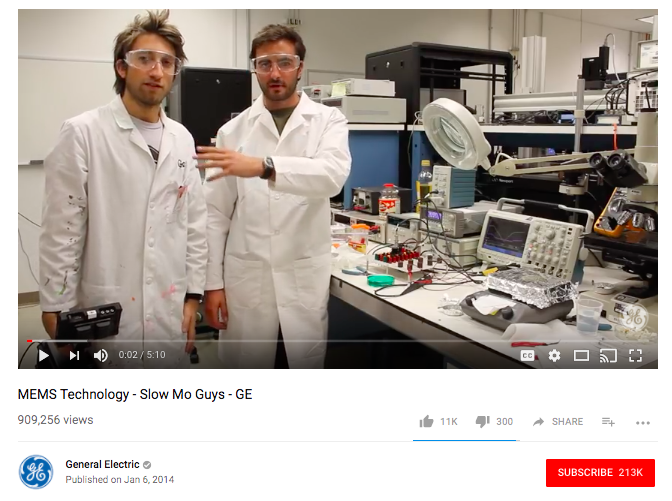
"It received a great response by their audience. We were able to get in front of a new set of eyes that had an interest in this sort of high-touch, high-tech world."
Engagement Analysis
Understanding which factors contribute to viewers interacting with your YouTube videos will ultimately help you increase that level of engagement over time. This is where engagement analysis comes in -- and it can take many shapes. For example, the folks at GE might run a watch time report to see how long viewers stick around for. This information can then be used to inform the ideal length of the videos for their next series.
"Once the videos have been published, GE measures their success based on shares, engagement time, and completion rate, metrics it will often compare against benchmark data covering the rest of the marketing industry," revealed business writer Aaron Taube in a Contently article on GE's video strategy.
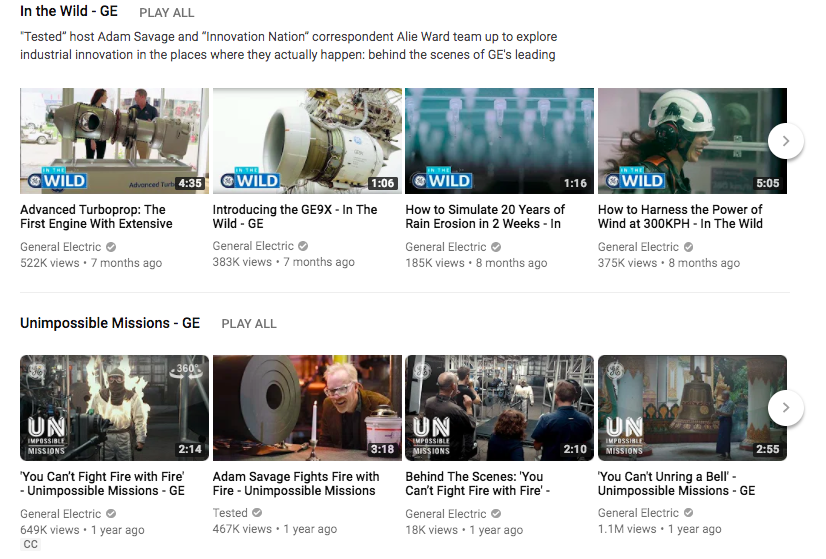
After reviewing the GE YouTube channel homepage with this strategy in mind, it seems most of its videos fall between 1-5 minutes. This suggests it's already identified this range as the best fit for audience engagement -- and are sticking to it.
Retention Analysis
Figuring out which videos have both a high audience retention rate and a long watch time will help you more easily map content to your audience’s interests. If you take a look at GE's top 30 most-viewed videos, you'll notice four videos from the "Crush It" series have made the cut -- with two of the four videos rounding out the top five:
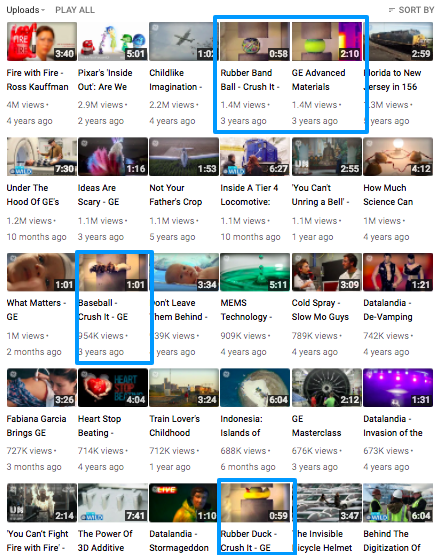
While we don't have GE's retention analytics to call up here, it's safe to assume that if these videos are being watched all the way through to the end, GE should:
- Invest in more snackable videos
- Create more content centered around pushing materials to their limits
Day 1: Watch the video and read the business breakdown above to gain a foundational understanding of content strategy on YouTube.
Then, take 20-30 minutes to reflect on your existing content strategy. At a high level, make note of the following:
- What is your top performing video? What contributed to the success of this video?
- What is your worst performing video? Why do you think this content missed the mark?
- What is an example of a video you thought would do well that failed to drive results? Where did your reasoning go wrong?
Taking the time to reflect on these questions will help you begin thinking critically about each of your videos, making it easier to understand how performance cues can and should inform your larger strategy.
Day 2-3: Conduct an audience analysis.
To create a tailored content strategy, you need to start by auditing your audience. The more you know about who is watching your videos, the easier it will be to create content that matches those viewers unique needs and interests.
This is where the demographics report comes into play, as it aims to demystify your audience’s age range, gender, and more.
To access this report, navigate to the Creator Studio. Then, in the left menu, click Analytics and then Demographics.
By default, the chart in your report is organized by gender distribution and age group for your channel or video, but you can add different dimensions to slice and dice the data as needed.
Day 4-5: Conduct an engagement analysis.
Understanding which factors contribute to viewers interacting with your YouTube videos will ultimately help you increase that level of engagement over time. To identify interaction patterns and trends, look to the following reports for insights: Comment reports, Sharing reports, Likes and dislikes reports, Subscribers reports, and Watch time reports.
Each of these reports can and should be analyzed to identify formats, topics, and lengths that appeal to your audience and inspire the most action.
Day 6-7: Conduct a retention analysis.
Figuring out which videos have both a high audience retention rate and a long watch time will help you more easily map content to your audience’s interests. To uncover the videos that align with this sweet spot, look to the Absolute Audience Retention report. This report shows you how much of a video people watch and which points in the video people engage with or leave.
To access this report, navigate to the Creator Studio. Then, in the left menu, click Analytics and then Audience Retention.
When analyzing this report, try to group videos by the type of watch activity they represent. For example, you might bucket together all of the videos that reveal a gradual decline in viewers, and the devise a strategy around how to keep people interested and engaged until the end.
Congrats! If you've made it this far -- and completed your homework along the way -- you might be starting to see the fruits of your labor take shape. But trust us, there's even more growth where that came from.
The strategies we covered in this 30-day guide only scratch the surface in terms of what's possible on YouTube. And now that you have the foundational knowledge, it's up to you to keep at it -- Keep learning, keep pulling data, keep innovating, and keep getting better.
We're rooting for you.
How To Generate Better Leads With Video