



Overview………………………………...3
What Are Integrations?………………...4
Why Use Integrations?…………..….….5
Who Needs Integrations?………….…..6
How Do You Get Integrations?………..7
Integrations and API…....……………...8
Popular Integrations…………………...10
Conclusion……………………………...26
Overview
Have you ever found yourself working on a project in which you had to toggle between multiple software and applications? Perhaps you had to plug data from one system into another or rewrite the same content over and over again to ensure it was in multiple locations.
Although few people have the time or patience for this type of tedious work, it’s highly common and often critical to your business’s success — these mundane tasks need to get done.
What if there was a way to connect your software to the applications you use in a way that successfully brings them together? This would mean all of your information and data would live in a central location with no manual entry required, even if those applications don’t actually come with the software itself … sound nice?
Well, good news! This type of solution exists … it’s called an integration.
What Are Integrations?
Integrations are a complex topic to understand. So, let’s simplify the concept with the help of an analogy we can reference throughout this guide. Let’s pretend you want to plug your MacBook laptop into your TV using a connector cable so you can watch reruns of Friends on Netflix on the big screen. Integrations kind of work like this — I’ll explain more as we go.
pic
What Are Integrations?
Integrations connect your software to third-party applications so they can share information with each other. They share data from one system to the next which provides you with more features and options while using your software.
pic
Back to our analogy: If your software is your laptop, you’ll use a connector cable, or integration, to then watch Friends on the TV, or application
Now, let’s run through some commonly asked questions about integrations to help you get a better grasp on what they are, how they work, and why your company needs them.
Why Use Integrations?
Integrations solve and simplify your need for new software as your business grows and evolves. They allow you to keep the system you’re currently using by simply adding connections to third-party applications to enhance system functionality and provide additional features you may need but aren’t able to build within your software.
You can keep your current laptop and TV, and simply use the connector cable to watch Friends on the big screen. By leveraging integration connections across your systems, you can power your business to achieve a much wider range of tasks on your software as you enhance its functionality. This is especially helpful as your business expands since your needs are bound to change.
Although your software may have the functionality you need when you start your business, you’re likely going to want additional applications to provide the features you end up needing later on, as you grow.
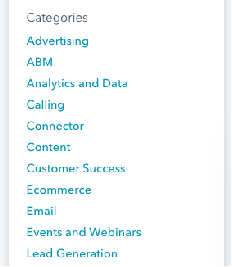
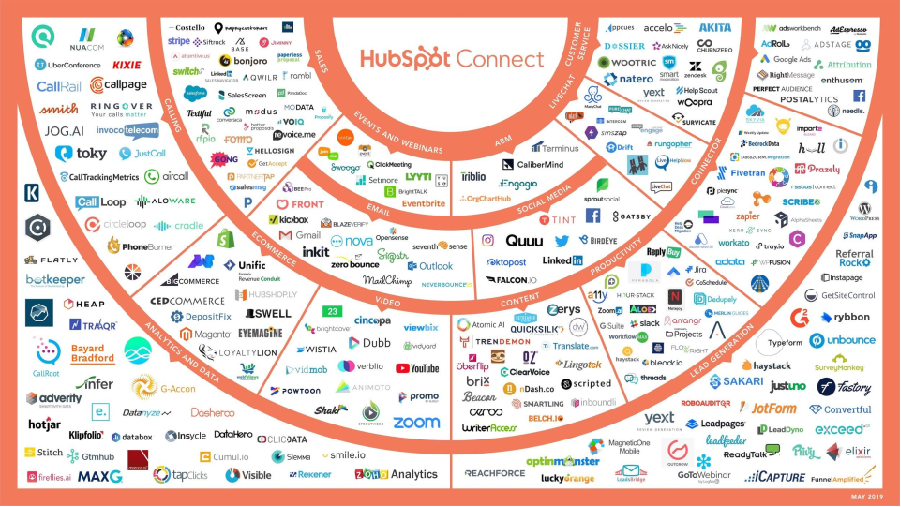
There are many types of integrations, each of which have specific functions to help meet different needs. The easiest way to think about the various types of integrations is by category. Some integrations have several functions, meaning they could technically fit into many categories because they serve.
Who Needs Integrations?
Integrations are helpful tools for virtually every business, no matter the size or industry. There are integrations suited for every type of company (startups, SMBs, and enterprise companies) with any purpose (advertising, analytics, or content).

If you sell software, you’ll find yourself not only using connections for your internal software but also for your customers to use along with your software. This is because your software may not have every feature and function your customers need to run their business. So, by adding an integration, they’ll get that added feature or function while continuing to use your software.
Referring back to our analogy, without the integration, or connector cable, your laptop wouldn’t be able to communicate with your TV to allow you to watch Friends on the big screen. You need that integration, or cable, to allow for added functionality and watch the show on TV — without it, this wouldn’t be possible.
How Do You Get Integrations?
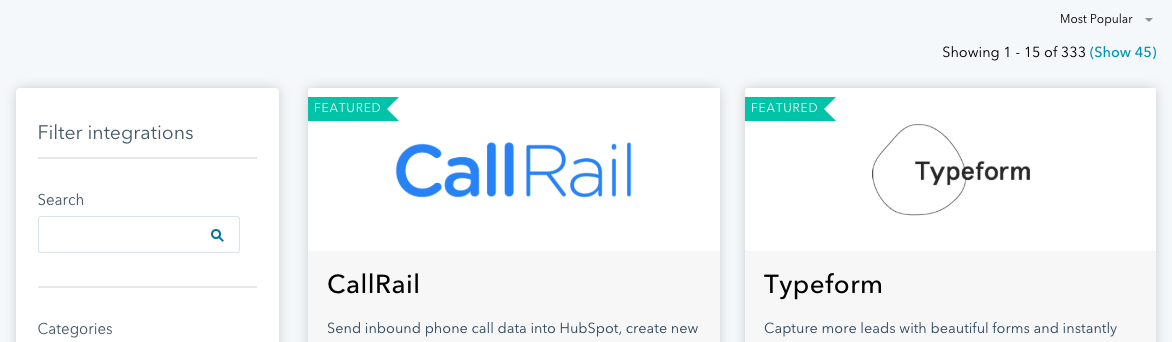
Integrations are almost always located in some type of marketplace, where customers can review and browse all of their options. The HubSpot Integrations & Application Marketplace is an example of this. Their marketplace allows visitors to search and learn more about the various integrations and their functions, and then connect HubSpot to their integration of choice.
( No, you can’t go to Best Buy to pick up your integration as you would with your connector cable to watch Friends on your TV… you’re right, the example doesn’t quite work here.)
How Do Integrations Work with APIs?
API stands for application programming interface. An API is an interface that software uses to receive information (whether that’s data, servers, applications, etc.).
All of the integrations we’re going to discuss below are built on APIs. By building integrations on APIs, you can connect your integrations to your software and use them in tandem with one another. The integration allows for the flow of information to and from apps and devices in real time — APIs allow them to talk to one another.

Think about this in terms of our analogy from above: The application is the TV, the programming allows your laptop to communicate with the TV, and the interface is how you (the user) are able to interact with the application (by watching Friends on your TV). In this example, the API is the port on the side of your laptop in which you actually insert your integration (the cable) to then connect your laptop to your TV.
pic
Integration vs. iPaaS Solution?
If you’ve heard of integrations before, chances are you’ve also heard about iPaaS, or Integration Platform as a Service. The difference between the two is an important distinction to make when determining which one you need for your business. While an integration is a one-to-one, direct connection solution, an iPaaS solution is not.
Instead, iPaaS is a cloud-based platform that connects your applications and systems — whether that’s in the cloud or on-premise — between an organization and third-party software without the use of middleware.

So, if you look for an integration solution on your software’s marketplace and don’t find the connection you’re looking for, then you’d turn to an iPaaS solution to solve your need for that connection. There are a few integrations available today (called “connector integrations”, which we’ll cover an example of below) that can help you build custom integrations…
So, which integrations should you actually use? Let’s look at a list of some of the most popular integrations available.
Popular Integrations
The following integrations are categorized by business need to help you browse through your options. (Almost all of these integrations fit into multiple categories, as they have functions that allow them to do multiple things. Below, we placed them in the category they’re best suited for.)
It’s important to note these are just some of today’s popular integrations — there are hundreds of more integrations to learn about and choose from as your business grows. The list we’ve compiled below is of integrations that connect with HubSpot. This isn’t to say these HubSpot integrations don’t also work with other software. In fact, most of these integrations are compatible with dozens of programs in addition to HubSpot.
Let's take a look.
Advertising Integrations
Advertising integrations help you market to and reach your target audience. Data about the success of your ads and/ or the leads obtained from them is automatically added to your HubSpot CRM so you can learn more about the people who interact with your ads and nurture them into customers.

Facebook Ads:
The Facebook Ads integration allows you to connect your Facebook Ads account to HubSpot. This integration gives you the ability to attribute your ads directly to the contacts who interact with them. It also allows you to review real data about which ads impact your bottom line. This simplifies the reporting process for all of your Facebook Ad efforts.
AdRoll:
Different businesses and products have various buyer personas. The AdRoll integration gives you the opportunity to create personalized retargeting ads for different lead segments in your HubSpot contacts. You can personalize several parts of the ads, such as content and formatting, that will best relate to your prospect. This allows you to focus on your audience’s attributes so you can effectively reach your prospects — you can gather intricate details about your prospects from your CRM via the integration so you’re able to successfully retarget them.
Insta Page
If you’re not a developer, creating your website’s landing page might sound like an overwhelming task. The Instapage integration provides a straightforward option for anyone who wants to create and personalize their landing page and then send lead information straight to HubSpot. These details are automatically placed under the associated contact in HubSpot for you— meaning, there’s no need to perform this transfer manually.
ABM Integrations
ABM stands for account-based marketing. These integrations help you leverage your account and audience data so you can tailor your messaging, CTAs, and marketing strategies to close deals and attract customers.
Analytics and Data Integrations
Calling Integrations
Whether it’s a meeting with fellow employees or your prospective and current customers, calling integrations will make all phone and video call interactions simple. Your contact’s information and details about the call will be recorded in HubSpot for easy access. This also provides sales reps and support team members with the necessary background information to assist the prospect or customer appropriately.
Connector Integrations
Connector integrations provide you with access to dozens of applications which sync to HubSpot to save you time and add functionality. Some connector integrations offer a wide range of applications and some have more specific types of applications. Additionally, some connector integrations can assist in creating a custom integration to suit your needs.
PieSync:
The PieSync integration provides real-time, two-way contact sync. This means every time you add a contact to HubSpot, it automatically syncs to an application (such as Google Contacts or Outlook), and vice versa — you don’t need to worry about any importing or exporting, expediting and simplifying your contact syncs.
Content Integrations
Content integrations help you create, design, and share custom content for your website. They also help you learn about who’s interacting with the content and how they’re interacting with it. That information is then synced to HubSpot so you can organize it and add it to specific contacts.
If your website has a collection of blog posts, the Beacon integration might be a good option for you. The integration ensures your content looks professional and allows you to drive more leads by getting more value out of your existing content — it connects to HubSpot to automatically convert your blog posts into downloadable content such as eBooks.
Belch.io
Customized landing pages, web pages, and emails provide a professional look and feel for your visitors, leads, and customers while interacting with your business online. The Belch.io integration connects to HubSpot so you can personalize and brand all of these things in just minutes. It’s a great option for anyone without a background in coding or web development who wants to design and customize their site pages and emails to complement their brand all from HubSpot.
Customer Success Integrations
Customer success integrations connect to HubSpot to make your internal and external interactions with employees (cross-team) and customers straightforward. They simplify communication and help you share information and/or data when you need to.
Slack
The Slack integration is a digital workspace and communication tool that allows you to connect and talk with your team members. The integration is ideal for team collaboration and coordination from anywhere. By connecting the integration to your software, you can use Slack’s and HubSpot’s features in either the application or the software so you don’t have to waste time toggling back and forth — the same information will be found in both locations in real time.
Ecommerce Integrations
If you have an online store, ecommerce integrations are a great way to learn about what your customers and visitors are doing while they’re on your website. By connecting these integrations to HubSpot, you’ll know when your visitors are most frequently abandoning your site or their carts so you can create re-engagement content to regain their interest.

The Shopify integration allows you to easily incorporate all of your ecommerce data and customer data within HubSpot. It automatically syncs customer, product, and deal information in HubSpot under the associated customer’s profile, so your entire team can view all of these details in one location. You can also create cart abandonment nurturing tactics, re-engagement ads for your website from HubSpot once you connect the integration to the software.
Typeform
The Typeform integration helps you create and design web and mobile forms for your leads. You can create contact forms, sign up forms, quizzes, and more, and all of your responses will automatically be sent directly to HubSpot so you can easily review your results and responses and compile them under the associated contact in HubSpot.
Magento
The Magento integration helps you create and send upsell, cross-sell, and reorder emails as well as develop abandoned cart nurturing tactics to boost your conversions. It automatically sends all of your customers’ ecommerce-related data, as well as emails between you and your customers, straight to their respective HubSpot contact record.
Email Integrations
Email integrations help you track a prospect’s interactions with sales reps, personalize your email automation with certain contacts, and measure the success of your email campaigns among your target audience — all from HubSpot.
Mailchimp
The mailChimp integration allows you to sync HubSpot with your email service provider. You can build email campaigns and rest easy knowing the Intelligent Error Handling feature will continue engaging your contacts even if a syncing error occurs between the software and application. By connecting MailChimp to HubSpot, you’ll have the ability to automatically add contacts from HubSpot into your application’s email lists and vice versa so you never have to do it manually.
Front:
The Front integration is a collaborative inbox, meaning all members of your team can see and access your contacts, review deals, and see all activity history while working in HubSpot. All of these details are automatically synced in Front and your CRM. This helps you improve your customer experience and ensure it remains consistent no matter which employees your customers work with.
Event and Webinar Integrations
Whether it’s an in-person event, a webinar, an online meeting, or a video conference, the following integrations simplify every aspect of hosting an event. They allow your contacts to book meetings with you and you can update all information related to your contacts post-event or meeting in HubSpot.
Go-To Webinar
No matter the type of event you’re hosting, the GoToWebinar integration automatically syncs all of your registrant and participant information in HubSpot under the associated contact. You’ll never have to worry about manually importing data about your webinar contacts again — instead, you’ll have more time to focus on the event itself.
Lead Generation Integrations
Lead generation integrations help you transition early-stage leads into delighted customers. All of your leads’ information will automatically be synced to HubSpot so you can view it at any point during the buyer’s journey. This is helpful to learn more about your target audience and to manage customer information so your sales and support teams can refer to it if needed, all from one location.

WordPress:
The WordPress integration helps you optimize and align your WordPress website with the data about your contacts and business goals you have in HubSpot. Your HubSpot account and all of your growth tools will automatically be connected to your WordPress site so you can work to attract, engage, and delight site visitors and customers on your site from either WordPress or HubSpot.
Unbounce:
The Unbounce integration helps you with the lead capturing and nurturing processes. You can create lead generation forms and send all data collected about your leads directly to HubSpot. At any point in time, you can take this data about your leads and use it to create campaigns. You’ll also have the ability to export any data in just seconds from your Unbounce account and share it anywhere.
Sales Integration
Sales integrations help you bring your sales tools, tactics, and prospects’ information together using HubSpot. You’ll be able to keep your marketing, support, and sales details in a central location for all teams to access, analyze, and refer to as needed.
HelloSign:
Once connected to HubSpot, you’ll automatically be notified of any action a prospect takes on any document you send them with the HelloSign integration. Examples of the actions you’ll be notified about include when a prospect or customer receives, opens, or signs the document. Then, this activity data is sent to the contact it belongs to in HubSpot so reps know where the prospect or customer is in the buyer’s journey and how they should go about following up with them.
Social Media Integrations
Understanding your social media following is a huge part of successful marketing. Social media integrations help you learn about your followers, understand the type of content they interact with and share, and automate specific parts of your social media strategy.
Facebook:
With the Facebook integration, you can automatically connect your business’s Facebook account to HubSpot. Schedule Facebook posts ahead of time analyze and measure post’s performance. This integration is ideal if you want to manage your Facebook marketing strategy alongside your other social media marketing strategies directly from HubSpot.
LinkedIn:
By connecting your LinkedIn account to HubSpot through the LinkedIn integration, you can easily engage with your network and communicate with all of your contacts from HubSpot. You can also auto-publish your blogs and share specific content with your followers to nurture them into leads and customers. This integration is also great for tracking engagement along with all of your other social media channels and marketing efforts all from HubSpot’s social media tool.
Twitter:
Schedule Tweets ahead of time, monitor Twitter streams, view Tweets and Twitter interactions of your competitors, and monitor accounts that are important to your brand from HubSpot with the Twitter integration. All information about your current and new followers will be added to your contact lists in HubSpot so everything is organized appropriately.
Video Integrations
With the rise of video and video marketing in business today, integrations that help you incorporate this media on your website have become quite useful. They allow you to create and implement videos on your site pages and forms as well as measure the success of your video marketing efforts.
Wistia:
The Wistia integration provides you with the ability to integrate videos on your website, and then incorporate HubSpot forms with those videos to improve video engagement (and hopefully, conversion) rates. If any lead converts on a video, their information is automatically sent to HubSpot so you’ll have their video-viewing data paired with their contact details.

Promo:
With the Promo integration, you can choose from over three million clips, templates, and music options to use to create a video for your site directly from HubSpot. You can easily throw in custom messaging, branding, or logos to personalize the video for your business based on a specific prospect’s needs and interests, found under their specific contact in HubSpot.
Get Integrated to Grow Better
Integrations have the power to enhance all aspects of your business. No matter the software you use to run your company, you can find integrations that can help simplify your processes, optimize your efforts, and empower your fellow employees. So, find the right integration marketplace for your software and begin connecting to the applications suited for your business needs.
Interested in learning more about how our services can help your business create a better customer experience with integrations?